SY DEV LABS
OverHub FeatureHardware NVENC/AMFZero Hotkeys NeededSmart Event Triggers100% Local Storage

Automatic Overwatch 2 Highlight Recorder

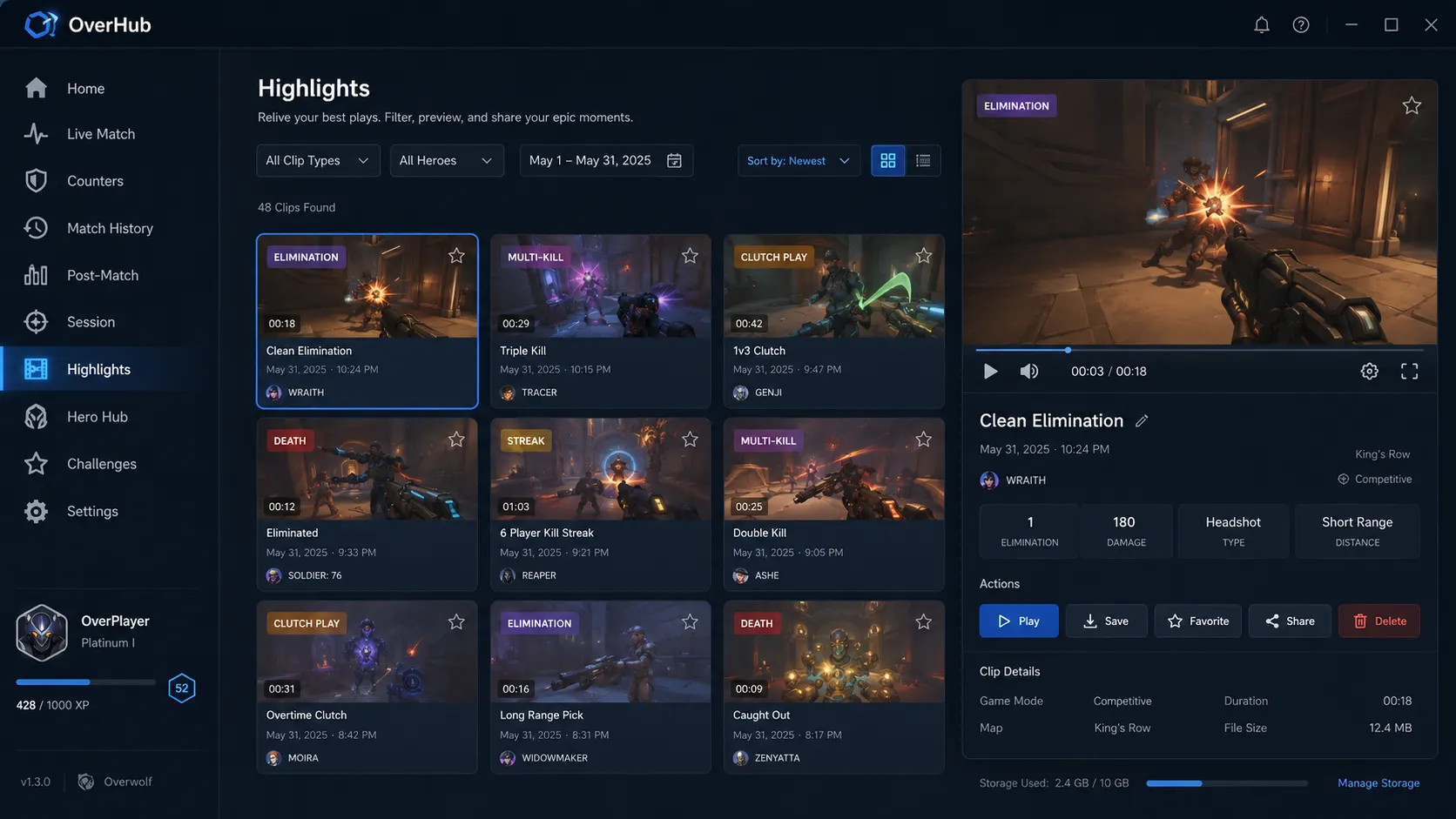
Never miss a game-winning play again. OverHub monitors in-game event telemetries and automatically saves your multi-kills, ultimate shutdowns, and clutch plays in buttery-smooth 1080p 60fps directly to your local drive.

Get Auto Recorder Free
Windows 10 / 11 Compatible
OverHub highlight recorder interface displaying automatically saved match clips

Official In-Game Events That Trigger Automatic Capture

⚑

Multi-Kills & Team Kills

Instantly captures triple, quadruple, quintuple, and team wipes with a 5-second lead-in buffer showing the setup.

πŸ›‘οΈ

Ultimate Shutdowns

Eliminating an enemy mid-ultimate (e.g. canceling Nano-Blade, Death Blossom, or Graviton Surge) is auto-clipped.

🎯

Environmental Knock-Offs

Lucio boops, Roadhog hooks, and Pharah concussive blasts that send enemies off the map edge.

Zero Performance Impact on Your Gameplay

Unlike generic screen recorders that tax CPU threads and cause frame drops during combat, OverHub connects directly to hardware encoding blocks:

0.0%
FPS Drop Benchmark

Measured on RTX 3060 / 4070 series

1080p
60 FPS Crystal Clarity

High bitrate, ready for Discord/TikTok

100%
Local Storage Privacy

Never uploaded to external servers without consent

Frequently Asked Questions

Everything You Need to Know

How does OverHub know when to record a clip without me pressing a hotkey?

OverHub connects to the official Overwolf Game Events API for Overwatch 2. When an official game event fires (such as a triple kill, quad kill, team kill, or ultimate shutdown), OverHub retroactively bookmarks and clips the preceding 15-30 seconds directly from GPU buffer memory.

Will auto-recording cause FPS drops or micro-stutters during intense fights?

No. OverHub leverages native hardware NVENC (Nvidia) and AMF (AMD) encoders. Encoding happens on dedicated silicon blocks on your GPU, leaving CUDA/graphics cores 100% free for high-framerate Overwatch 2 rendering.

Where are my recorded clips stored, and can I configure disk space limits?

All clips are saved 100% locally on your PC drive in high-efficiency MP4 format. You can set a maximum storage quota (e.g., 20 GB) in settings, after which oldest unpinned clips will be automatically rotated out.

Connected Intelligence

Related Guides & Tools

All Guides β†’
Ready to Upgrade Your Gameplay?

Experience the Official In-Game Overlay

Join thousands of PC gamers using SY DEV LABS tools on Overwolf. Free, lightweight, and engineered for high-performance gaming.